Showing posts with label Mailbox Moves. Show all posts

Wednesday, June 24, 2020

RecipientNotFoundPermanentException when migrating a mailbox to Exchange Online

The other when migrating a mailbox from an on-prem Exchange 2013 environment to Exchange Online, I was faced with a RecipientNotFoundPermanentException error with the message “Error: Cannot find a recipient that has mailbox GUID '39c970e4-4869-47ee-b9af-f6fd6264ee0a'.


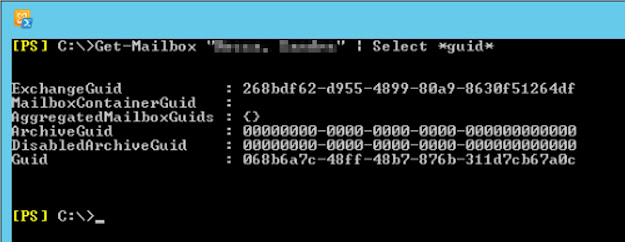
These were the details for the mail user in Exchange Online (notice the ExchangeGuid attribute):


 And these were the details for the mailbox on-premises:


As you can see, the ExchangeGUID was the same! And where was that '39c970e4-4869-47ee-b9af-f6fd6264ee0a' GUID coming from?!

After much troubleshooting, I ended up logging a support ticket with Microsoft. According to the engineer, “this issue is caused due to multiple mailbox shards”. Unfortunately, he wouldn’t go into details as apparently it is all secret stuff... But he ran some diagnostics to resolve the issue, and after a few minutes all was well with the world again!

Sunday, October 15, 2017

Exchange Mailbox Move History

A common task amongst many Exchange administrators around the world is moving users’ mailboxes between databases. This could be to move the user to a database with a higher quota limit, because the user moved to a different location so we want to move his mailbox to an Exchange server closer to his new location, simply because of an Exchange transition/migration, or for many other reasons.


Whatever the case might be, Exchange keeps track of these mailbox moves in case we need to find out, for example, where a mailbox was located before. To access this information, we need to run the Get-MailboxStatistics cmdlet against the mailbox we want to check and use the IncludeMoveHistory switch, such as follows (some output has been removed for brevity):
Get-MailboxStatistics nuno –IncludeMoveHistory | FL
or
(Get-MailboxStatistics nuno –IncludeMoveHistory).MoveHistory

Status                           : Completed
Flags                            : IntraOrg, Pull
SourceDatabase                   : MDB2
SourceVersion                    : Version 14.3 (Build 224.0)
SourceServer                     : server2.nunomota.pt
SourceArchiveDatabase            :
SourceArchiveVersion             : Version 0.0 (Build 0.0)
SourceArchiveServer              :
TargetDatabase                   : MDB01
TargetVersion                    : Version 15.0 (Build 1076.0)
TargetServer                     : server1.nunomota.pt
TargetArchiveDatabase            :
TargetArchiveVersion             : Version 0.0 (Build 0.0)
TargetArchiveServer              :
BadItemLimit                     : 0
BadItemsEncountered              : 0
LargeItemLimit                   : 0
LargeItemsEncountered            : 0
QueuedTimestamp                  : 6/18/2017 12:51:20 PM
StartTimestamp                   : 6/18/2017 12:51:26 PM
FinalSyncTimestamp               : 6/18/2017 12:52:17 PM
CompletionTimestamp              : 6/18/2017 12:55:16 PM
OverallDuration                  : 00:03:55.2744307
TotalFinalizationDuration        : 00:02:57.7932767
TotalSuspendedDuration           : 00:00:00
TotalFailedDuration              : 00:00:00
TotalQueuedDuration              : 00:00:00.7499765
TotalInProgressDuration          : 00:03:54.5244542
TotalStalledDueToHADuration      : 00:00:00
TotalTransientFailureDuration    : 00:00:00
MRSServerName                    : server2.nunomota.pt
TotalMailboxSize                 : 51.25 MB (53,742,458 bytes)
TotalMailboxItemCount            : 669
Message                          :
FailureTimestamp                 :
Report                           :


“The IncludeMoveHistory switch specifies whether to return additional information about the mailbox that includes the history of a completed move request, such as status, flags, target database, bad items, start times, end times, duration that the move request was in various stages, and failure codes.”


The number of moves that are kept in Exchange will depend what version of Exchange you are running. For Exchange 2010 the default value is 2 while for 2013 it is 5. However, this number can be customized by editing the Mailbox Replication Service (MRS) configuration. To do this, open the MsExchangeMailboxReplication.exe.config file, which by default is located at C:\Program Files\Microsoft\Exchange Server\V15\Bin, using Notepad with Admin rights. Then, go to the MRSConfiguration section and update the MaxMoveHistoryLength setting with a value between 0 and 100.


To get a higher level of detail, we can instead use the IncludeMoveReport switch. This switch specifies whether to return a verbose detailed move report for a completed move request, such as server connections and move stages.

Monday, December 10, 2012

Mailbox Size Increases when Transitioning to Exchange 2013

If you are transitioning from Exchange 2007/2010 to Exchange 2013, we will see that the reported size of the mailboxes will increase around 30 to 40%! Don’t be alarmed just yet. The actual space used by the mailbox database will not increase by 30% as this only refers to the attribution of space used by each individual mailbox.

Basically, Exchange 2013 now includes in the mailbox size attribute all the properties of items in a mailbox, thus providing a more accurate calculation of space taken by items in a mailbox and, therefore, the whole mailbox itself.

The problem with this is that, during a migration, users might exceed their mailbox quota when their mailbox is moved to Exchange 2013 and be prevented from sending and/or receiving e-mails...

So, in order to prevent this from happening, I suggest increasing everyone’s mailbox quota by 40% prior to their move. You can either do this at the mailbox database level if your users are using the database quotas, or individually on a per-user basis.

For example, if you want to increase by 40% the ProhibitSendQuota value for all users that are not using the database quota defaults, you can use the following cmdlet:
Get-Mailbox -ResultSize Unlimited -Filter {UseDatabaseQuotaDefaults -eq $False} | Where {$_.ProhibitSendQuota -ne "unlimited"} | ForEach {Set-Mailbox $_ -ProhibitSendQuota "$($($_.ProhibitSendQuota).Value.ToMB() * 1.4)MB" -WhatIf}

However, don’t forget to set the IssueWarningQuota or ProhibitSendReceiveQuota if you are using them! Note that this is not the best method as users might end up with a quota of 1523MB for example when the ideal value would be 1500MB...

Wednesday, August 3, 2011

Concurrent Mailbox Moves in Exchange 2010


Have you ever tried to do a migration from Exchange 2007 to 2010 only to find Exchange seems to move only 2 or 5 mailboxes at a time? And where is the so useful –MaxThreads parameter we used with the Move-Mailbox command?!

With Exchange 2010, this changed... Without going into detail regarding the great asynchronous moves and the Microsoft Exchange Mailbox Replication service (responsible for moving mailboxes, importing/exporting .pst files and restoring disabled and soft-deleted mailboxes) here’s how you can increase the number of concurrent moves.

Because the MRS is responsible for all these tasks, it is throttled by default. The only way to tweak it is by manually editing the MSExchangeMailboxReplication.exe.config file, located on all CAS servers in the same folder where Exchange is installed: \Program Files\Microsoft\Exchange Server\V14\Bin\MSExchangeMailboxReplication.exe.config.

In this file, navigate to the MRSConfiguration section. In here you can edit the following properties:

MaxRetries - This property specifies the maximum number of times MRS will attempt to perform a task after encountering a transient failure. You can specify a value from 0 through 1000. The default value is 60.

MaxCleanupRetries - This property specifies the number of times that MRS should attempt to clean up a task. If the maximum number of attempts is reached, the task fails. You can specify a value from 0 through 100. The default value is 5.

MaxStallRetryPeriod - This property specifies the maximum duration for which MRS pauses while waiting for the Microsoft Exchange Information Store service to bring the target mailbox database into compliance with its configured data redundancy constraints. If the Microsoft Exchange Information Store service reports that the mailbox database is unhealthy, MRS will pause. If the maximum time is reached, the task fails. You can specify a value from 00:00:10 (10 seconds) through 05:00:00 (5 hours). The default value is 00:15:00 (15 minutes).

RetryDelay - This property specifies the amount of time MRS will wait before it attempts to perform a task again after a transient failure. You can specify a value from 00:00:10 (10 seconds) through 00:30:00 (30 minutes). The default value is 00:00:30 (30 seconds).

MaxMoveHistoryLength - This property specifies the maximum number of move histories to maintain in the mailbox. You can specify a value from 0 through 100. The default value is 2 move histories per mailbox.

MaxActiveMovesPerSourceMDB - This property specifies the total number of tasks MRS can perform that involve the mailbox database as a data source. Types of tasks include moving mailboxes located on the database, exporting mailbox data from mailboxes located on the database, and restoring mailbox data from the database. You can specify a value from 0 through 100. The default value is 5 concurrent tasks.

MaxActiveMovesPerTargetMDB - This property specifies the total number of tasks MRS can perform that involve the mailbox database as a data target. Types of tasks include moving mailboxes to the database, importing mailbox data into a mailbox located on the database, and restoring mailbox data to a mailbox located on the database. You can specify a value from 0 through 100. The default value is 2 concurrent tasks.

MaxActiveMovesPerSourceServer - This property specifies the total number of tasks MRS can perform that include the server as a data source. You can specify a value from 0 through 1000. The default value is 50 concurrent moves.

MaxActiveMovesPerTargetServer - This property specifies the total number of tasks MRS can perform that involve the server as a data target. You can specify a value from 0 through 1000. The default value is 5 concurrent moves.

MaxTotalMovesPerMRS - This property specifies the total number of tasks that a single instance of MRS can perform at a time. You can specify a value from 0 through 1024. The default value is 100 concurrent moves.

FullScanMoveJobsPollingPeriod - This property specifies how often each instance of MRS scans for new tasks. You can specify a value from 00:03:00 (3 minutes) through 1.00:00:00 (1 day). The default value is 00:10:00 (10 minutes).

As you can see from this list, there are 5 attributes that control the way mailbox moves happen:
- MaxActiveMovesPerSourceMDB
- MaxActiveMovesPerTargetMDB
- MaxActiveMovesPerSourceServer
- MaxActiveMovesPerTargetServer
- MaxTotalMovesPerMRS

So, depending on your environment, you will probably have to increase some of these. For example, if you’re moving 100 users from a single database to 10 different databases in one server, you will probably want to set the following (assuming you want to move 10 users at a time):
- MaxActiveMovesPerSourceMDB - 10
- MaxActiveMovesPerTargetMDB - 5 (just in case)
- MaxActiveMovesPerTargetServer - 10

If you have multiple 2010 CAS servers, just make sure any changes you make are also applied to the MSExchangeMailboxReplication.exe.config file on all of them.